AR Adjustment
AR (Accounts Receivable) Adjustment allows users to correct, update, or reverse customer-related transactions. This ensures your records remain accurate when fixing mistakes in invoices or payments.
💡 Note: Only transactions without a reference (or with a cancelled reference in Receive Payment) can be unposted.
How to Create a New Transaction
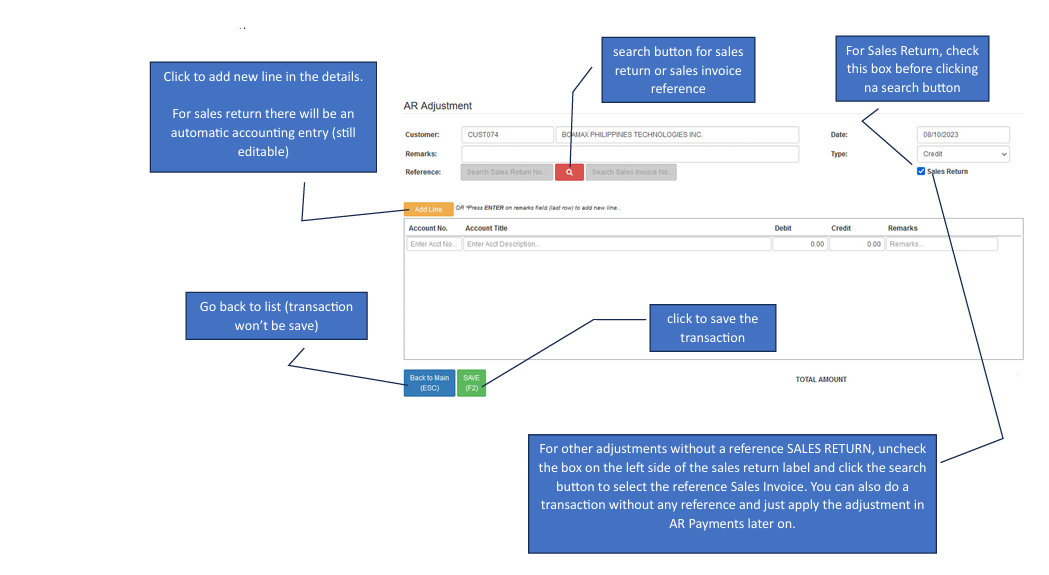
Open the Form Click the Create New button to start a new adjustment.
Choose your Reference Type > For Sales Returns: Check the Sales Return box before clicking the search button. This will generate an automatic accounting entry (which remains editable).For Sales Invoices: Uncheck the Sales Return box, then click the Search button to select your reference Sales Invoice.
Add Line Items Click the Add New Line button in the details section to insert your adjustment entries.
Save the Transaction Once all details are correct, click the Save button to finalize.
How to Edit a Transaction
If you need to modify an existing adjustment, follow these steps:
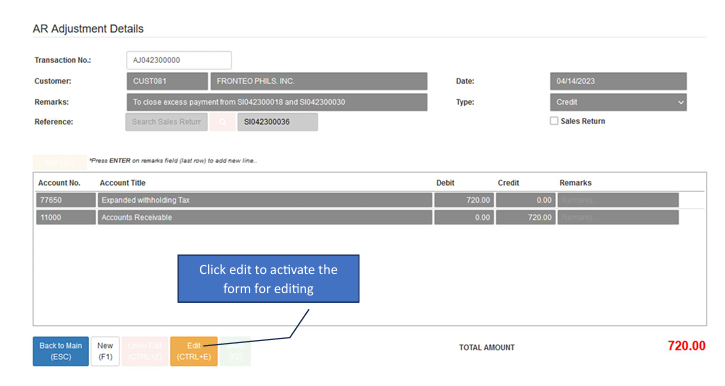
Activate Edit Mode Click the Edit button. This will unlock the form fields for modification.
Modify Details Update the necessary amounts or account titles.
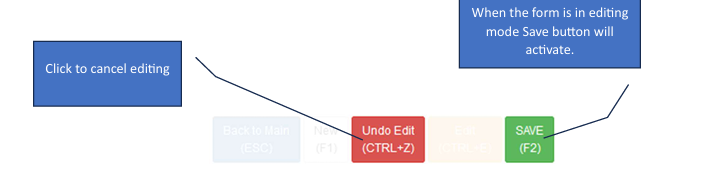
Commit Changes While in editing mode, the Save button will become active. Click it to apply your updates.