Sections
Sections define the inventory locations or categories referenced in inventory transactions such as transfers, physical counts, and inventory adjustments. They help ensure accurate tracking and control of stock movements within the system.
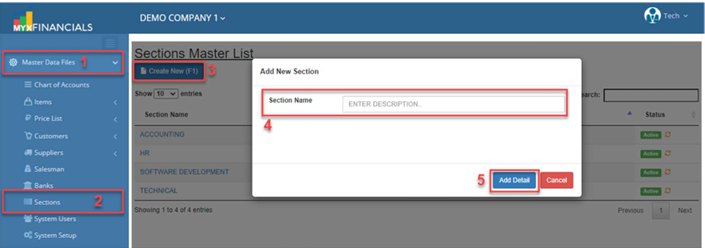
How to Create a New Section:
- Go to Master Data Files.
- Click Sections
- Click Create New (F1)
- Enter the details of the new section.
- Click Save (F2)
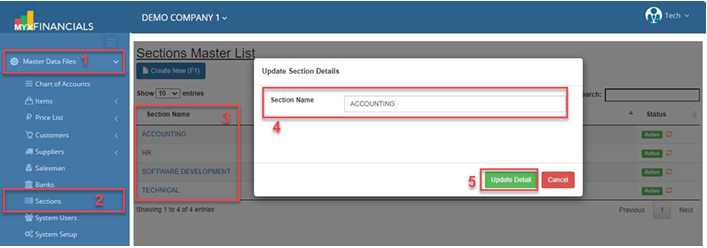
How to Update the Section:
- Go to Master Data Files
- Click Sections
- Select a section and click the blue font text or Section Name.
- Enter the new details of the section.
- Click Save (CTRL+S)
How to Inactive the Section:
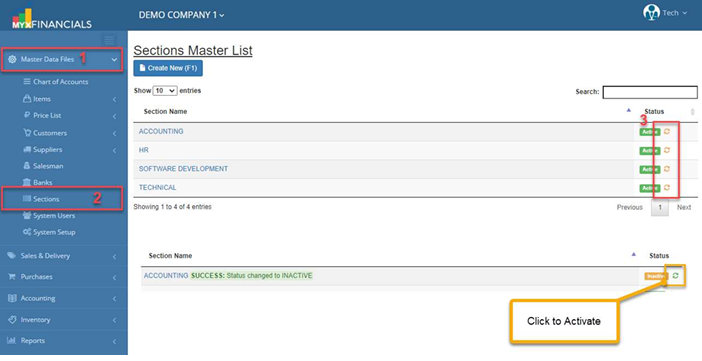
- Go to Master Data Files.
- Click Sections
- Click the yellow cycle icon or Inactive