Suppliers Type
Suppliers Type allows users to classify suppliers based on their category or business role. This helps organize supplier records, making it easier to manage transactions, purchasing activities, and reporting within the system.
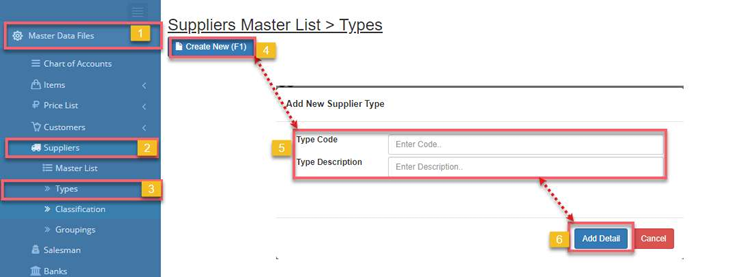
How to Add New Suppliers Type:
- Go to Master Data Files.
- Click Suppliers
- Click Types
- Click Create New (F1)
- Enter the details of the new suppliers.
- Click Save (F2)
How to Update Suppliers Type :
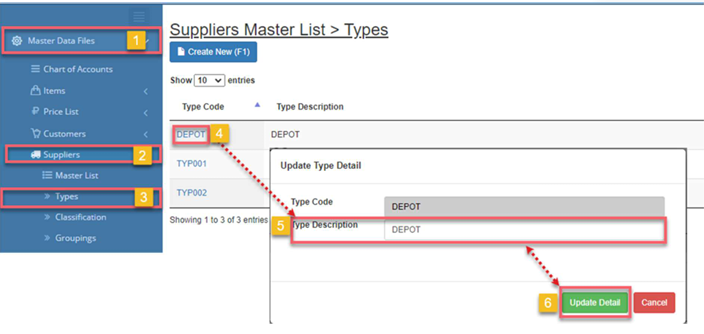
- Go to Master Data Files.
- Click Suppliers
- Click Types
- Click Code
- Update the details of the supplier’s type.
- Click Save (F2)
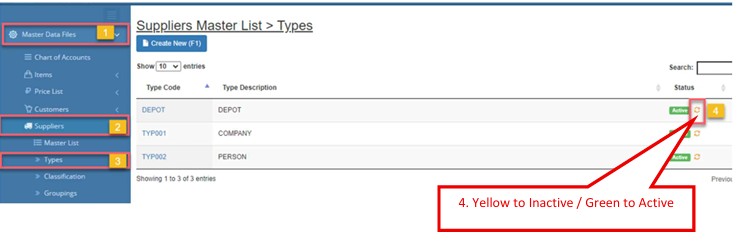
How to Inactive Suppliers Type:
- Go to Master Data Files.
- Click Suppliers
- Click Type
- Click the yellow cycle icon or Inactive
a. Click the green cycle icon or Active to activate the item.