
Special Discount
Special Discounts are used for standardized price reductions that apply to specific groups or special promotions. Unlike the standard matrix, these can be toggled between percentage-based or fixed-price deductions.
1. How to Add a Special Discount
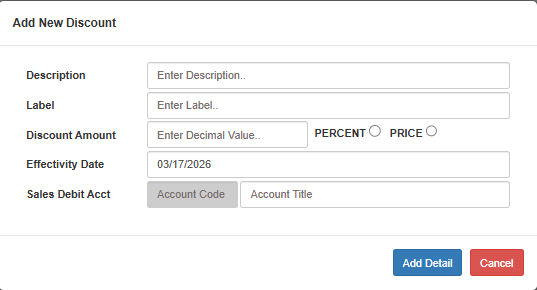
Navigate to Master Files > Price List > Special Discount.
Click Create New (F1)
Description: Enter a detailed name (e.g., "Senior Citizen 20%").
Label: Enter a short identifier for the discount.
Discount Amount: Enter a decimal value and select either:
PERCENT: To deduct a percentage of the total.
PRICE: To deduct a fixed currency amount.
Effectivity Date: Select the date when this discount becomes active.
Sales Debit Acct: Select the account code where the discount will be recorded.
Click Add Detail
2. Special Discount Mass Upload
For managing multiple special discount categories at once, use the Mass Upload feature.
Steps to Mass Upload:
Click the Mass Upload button (orange) in the Special Discounts List view.
Download Template: Click this button first to get the correct format for your data.
Choose File: Upload your completed template from your computer.
Select Action (Dropdown):
Preview: View the data to ensure accuracy before importing.
Save: Commit the data to the system.
Submit: Click the Submit button to execute the selected action (Preview or Save).
Comparison of Discount Types
🔹 Primary Use
- Discount Matrix: Item-specific sales or promotions
- Special Discount: Group-based (e.g., Senior/PWD) or flat promotions
🔹 Duration
- Discount Matrix: Has fixed start and end dates
- Special Discount: Starts on Effectivity Date (ongoing)
🔹 Type
- Discount Matrix: Usually percentage-based
- Special Discount: Can be Percent or fixed Price
💡 Tip: When using the Mass Upload, always use the Preview option in the dropdown first. This allows you to verify that your decimal values (Discount Amount) are correctly interpreted by the system before clicking Save.