
Bank Deposit
Bank Deposit is used to record and manage deposits from cash or customer payments into your bank accounts. This ensures that your cash inflows are properly documented and reconciled.
💡 Take note: Use this module if your Receive Payment "Deposit to Account" was set to Cash on Hand. This allows you to then move those funds from your physical cash into a specific bank account.
How to Create a New Transaction
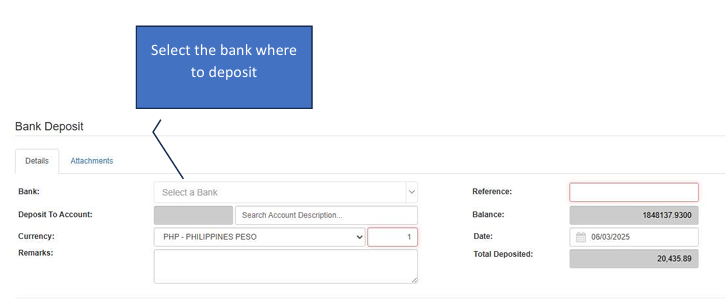
Click the Create New (F1) button.
Select Destination Bank: Select the specific Bank Account where the funds will be deposited.
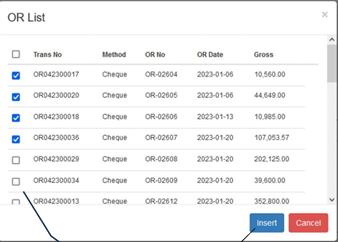
Load Payments: Click the Load OR button to fetch the list of pending payments available for deposit.
Select & Insert: Check the checkbox on the left side for each transaction you want to include, then click Insert.
Save: Once the total matches your physical deposit, click Save to finalize.
Tip: If you added a wrong transaction, click the Remove icon in the details section.
How to Edit a Transaction
Activate Edit Mode: Click the Edit button to unlock the transaction details.
Modify Records: While in editing mode, the Save button will activate.
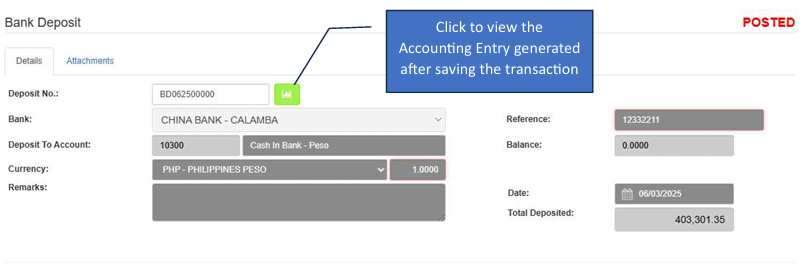
Review Accounting: After saving, you can click the Accounting Entry button to view the journal entries generated by the system.
Dashboard Actions

Void Transaction: Select a record and click Void to cancel an incorrect deposit.
Filtering: Use the parameters at the top to search for specific dates or banks.