System Settings
A "system setup" refers to the process of configuring and customizing the various settings, parameters, and options within the software to align it with the specific needs and processes of the business. System setup involves defining how the system will operate, what data will be captured, and how various features and functionalities will be used. Proper system setup is crucial to ensure that the software functions accurately and efficiently according to the organization's requirements.
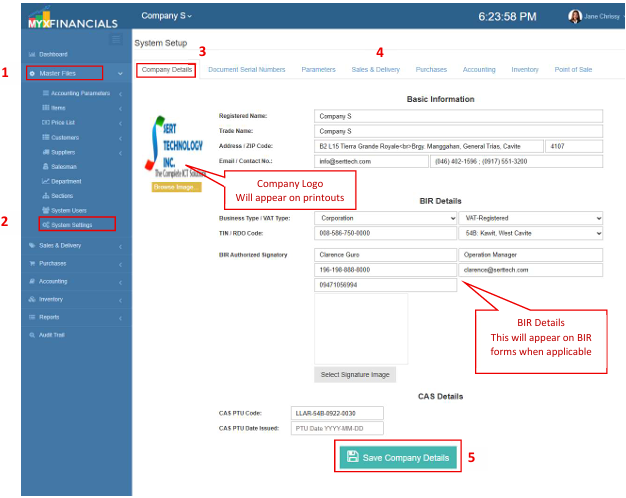
How to Setup or Update Company Information:
- Go to Master Data Files
- Click System Setup
- Click Company Details
- Enter the company information.
- Click Save Company Details.
How to Setup Document Serial Numbers:
This functionality ensures compliance with BIR CAS requirements on serial numbering of receipts and invoices, including the use of a minimum of six (6) running digits with leading zeroes and a clearly defined numbering convention.
- Go to Master Data Files.
- Click Document Serial Numbers
- Click Start New Year
- Edit the serial numberings as needed
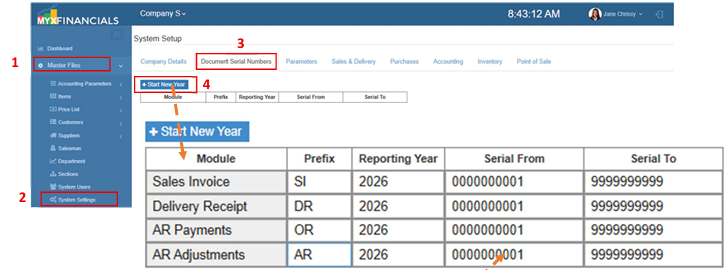
💡 Take note:The Start New Year function initializes the document serial number series for all transactions. Editing is allowed only within the Document Serial Number module. Upon exit, the system automatically saves and locks the series to prevent further modification.
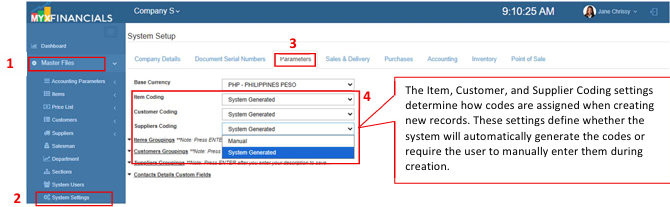
How to Setup the Base Currency:
- Go to Master Data Files.
- Click System Setup
- Click Parameters
- Select Automatic or Manual from the drop-down options.
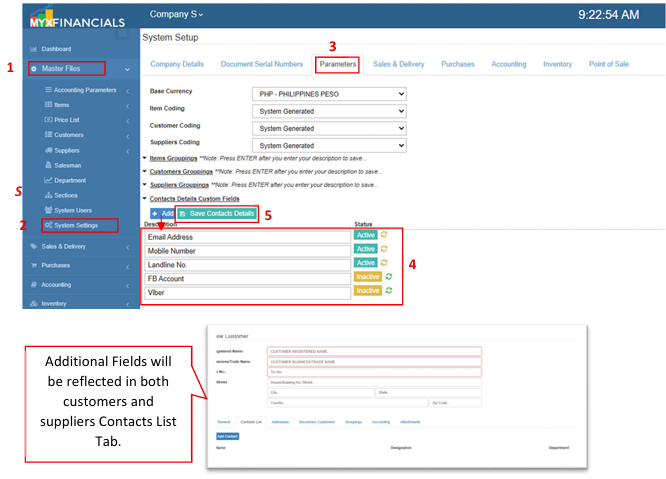
How to Add/Update Contacts Details Custom Field:
- Go to Master Data Files.
- Click System Setup
Click Parameters
Click Add to Add New Field or Edit the Description of an existing field.
Click Save Contact Details to save the changes.
✔️ You may also activate or deactivate a field by clicking the button on the right side.