
Purchase Reports
The Purchase module provides tools to monitor procurement activities and manage company liabilities through the Accounts Payable (AP) system.
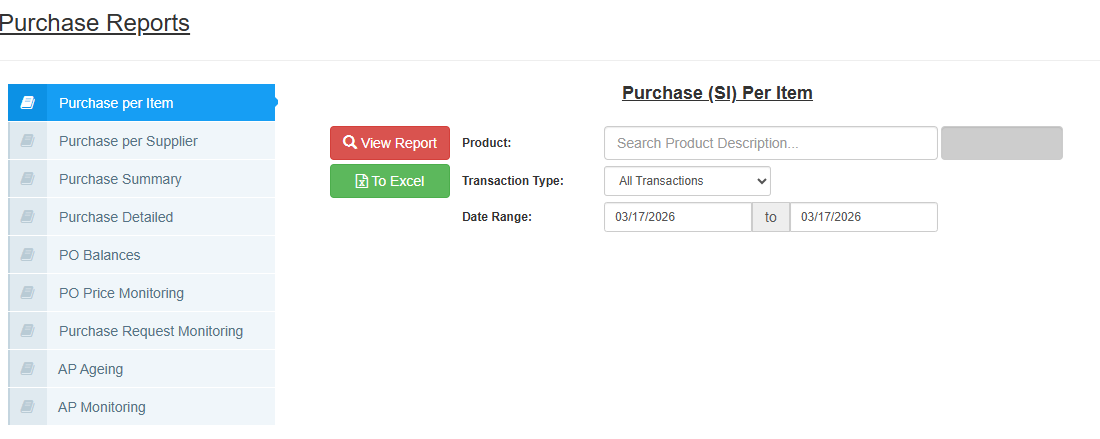 Figure 4: Statement of Account (SOA).
1. Summary of Available Reports
| Report Name | Purpose |
|---|---|
| Purchase per Item | Breakdown of purchases based on specific products. |
| Purchase per Supplier | Breakdown of total spend per vendor. |
| Purchase Summary / Detailed | High-level or itemized transaction history. |
| PO Balances | Monitors remaining quantities on open Purchase Orders. |
| PO Price Monitoring | Compares historical prices paid for specific items. |
| Purchase Request Monitoring | Tracks the status of internal PRs. |
| AP Monitoring | Real-time tracking of all unpaid supplier invoices. |
| AP Ageing | Categorizes unpaid liabilities by age (days past due). |
2. Standard Filtering & Action Buttons
Most reports in this module use the following filters:
- Supplier Name: Search for a specific vendor.
- Product: Filter by a specific item.
- Transaction Type: Toggle betweenAll Transactions,Posted,Unposted.
- Date Range: Select the start and end dates.
Actions:
- View Report (Red Button): Displays the report on the screen.
- To Excel (Green Button): Exports the data to a spreadsheet.
3. AP Ageing Parameters
The AP Ageing report requires specific setup to calculate your liabilities correctly.
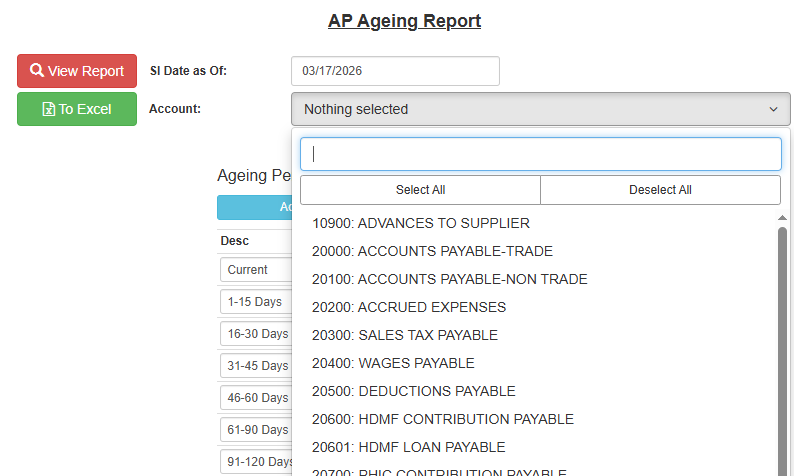 Figure 2: AP Ageing Parameters.
Key Parameters:
SI Date as Of: The reference date used to calculate the age of the invoice.
Account: Select the specific liability account to audit from the dropdown (e.g.,
20000: ACCOUNTS PAYABLE-TRADE,21300: VAT PAYABLE, or employee-related payables likeSSSandPHIC).Ageing Periods: Define your time brackets here.
- Desc: Label (e.g., "30 Days," "Overdue").
- From / To: Day ranges (e.g., 1 to 30).
4. Specialized Monitoring
PO Price Monitoring: Use this to track if suppliers are changing their prices over time. It serves as a historical record for better procurement negotiations.
PO Balances: Essential for identifying "backorders" or items that have been ordered but not yet received in the warehouse.