
Customer
The Customers List serves as the centralized record of customer information used across sales, invoicing, and reporting modules in the ERP system.
How to Create a New Customer:
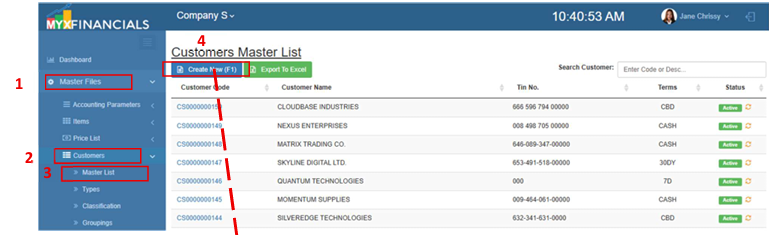
- Go to Master Data Files.
- Click Customers
- Click Master List
- Click Create New (F1)
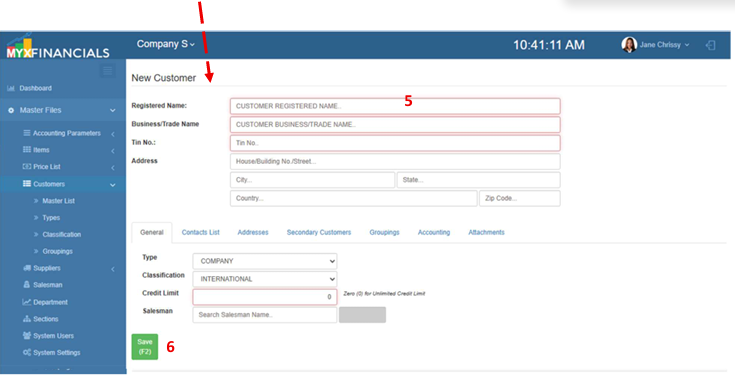
- Enter the details of the new customer.
- Click Save (F2)
💡 Take note: In the initial setup, the data for customers will be uploaded from the filled-out template by the clients.
How to Update the Customers:
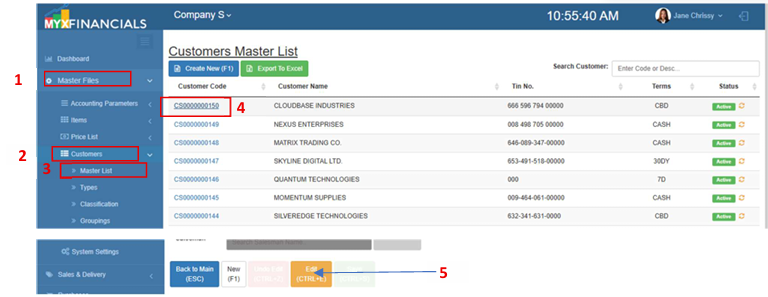
- Go to Master Data Files.
- Click Customers
- Click Master List
- Select a customer and click the blue font text or Customer Code.
- When the Client Details appears, click Edit (CTRL+E)
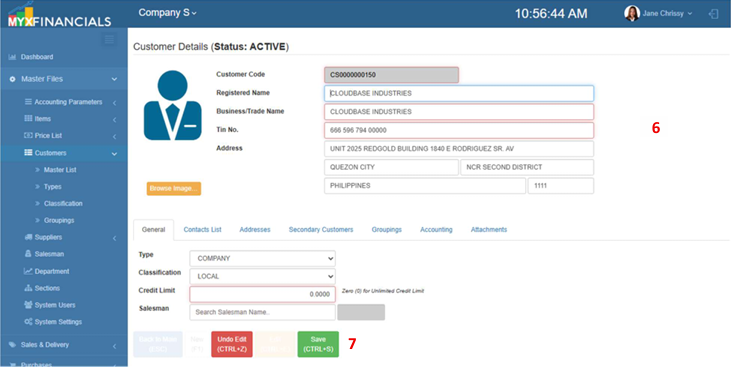
- Enter the new details of the customer.
- Click Save (CTRL+S)
How to Activate / Inactivate the Customer:
- Go to Master Data Files.
- Click Customers
- Click Master List
- Click the yellow cycle icon or Inactive
o Click the green cycle icon or Active to activate the item.