Customer Classification
Customer Classification in MyxFin allows users to organize customers into categories for better management and reporting. This module helps group customers by type, region, or any other custom criteria to streamline sales, invoicing, and reporting processes.
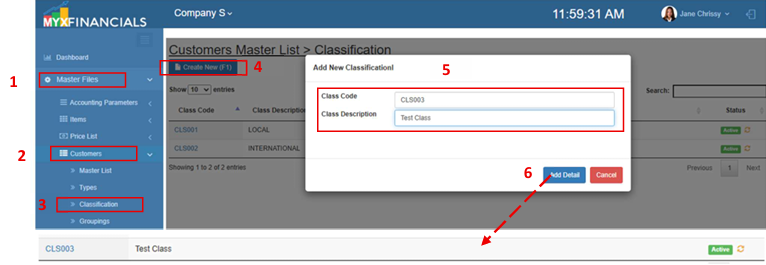
How to Add New Customer Classification:
- Go to Master Data Files.
- Click Customers
- Click Classification
- Click Create New (F1)
- Enter the details of the new customer classification.
- Click Save (F2)
How to Update Customer Classification:
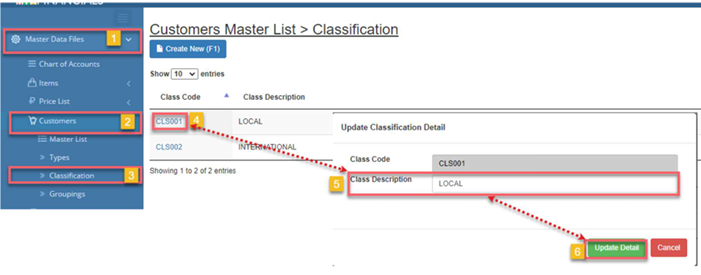
- Go to Master Data Files.
- Click Customers
- Click Classification
- Click Class Code
- Update the details of the customer classification
- Click Save (F2)
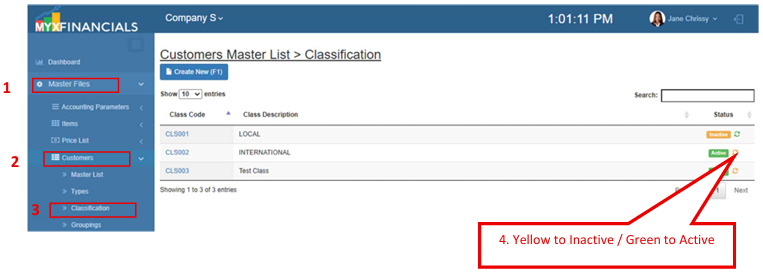
How to Inactive Customer Classification:
- Go to Master Data Files.
- Click Customers
- Click Classification
- Click the yellow cycle icon or Inactive
a. Click the green cycle icon or Active to activate the item.