Units Of Measure
The Units of Measure (UOM) module in MyxFin allows users to define and manage measurement units for inventory items. This ensures consistency when recording quantities for purchases, sales, and stock management.
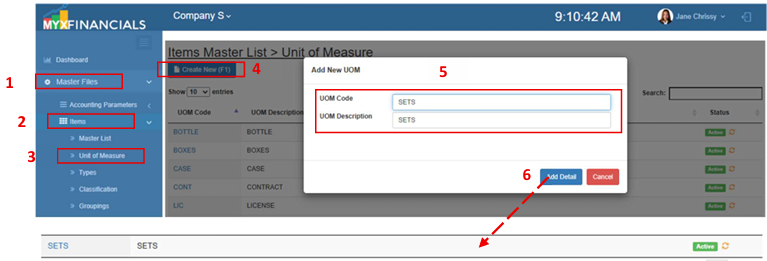
How to Create a New Unit of Measure:
- Go toMaster Data Files
- ClickItems
- ClickUnit of Measure
- ClickCreate New (F1)
- Enter the details of the new UOM.
- ClickAdd Details
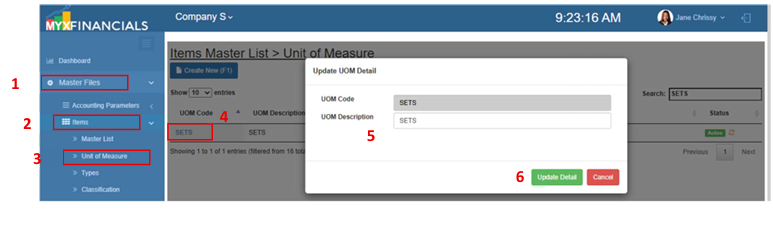
How to Update the Unit of Measure :
- Go toMaster Data Files
- ClickItems
- ClickUnit of Measure
- Select uom and click the blue font text or the UOM Code.
- Enter the updated details for the UOM
- Click UpdateDetail.
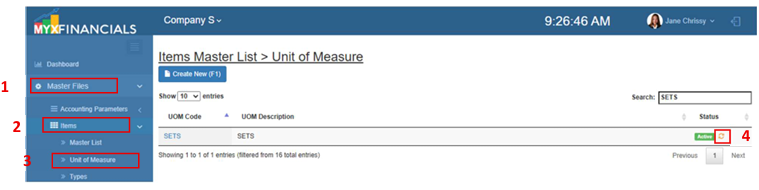
How to Active/Inactive Unit of Measure:
- Go to Master Data Files
- Click Items
- Click Unit of Measure
- Click Active(Green)/Inactive(Yellow) icon.