
Purchase Receiving
The Purchase Receiving module is used to document the arrival of goods. This step updates your inventory levels and serves as the basis for the Supplier's Invoice.
💡 Note: Transactions can only be unposted if they have no active references (or cancelled references) in Suppliers Invoice or Purchase Return.
How to Create a New Transaction
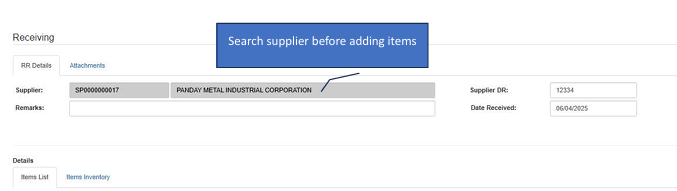
Start the Receipt
Click the Create New button.Select Supplier
Search for and select the Supplier before adding any items.Add Items (Two Methods)
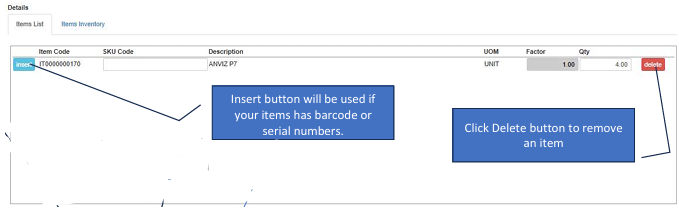
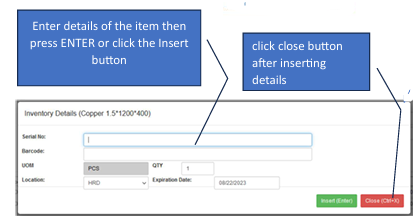
Method A: Manual Entry → Type the item details and press ENTER or click the Insert button. Use the Barcode/Serial button if the items have specific tracking numbers.
Method B: PO Reference → Click the PO Insert button. In the pop-up window, click the PO No., check the boxes for the items received, and click Insert.Review & Clean Up
If you added an incorrect item, click the Delete (Trash) icon in the details section.Save
Once the physical count matches the screen, click the Save button.
How to Edit a Transaction
✔️ Editing Tip: You can modify a transaction as long as it has not been posted or cancelled.
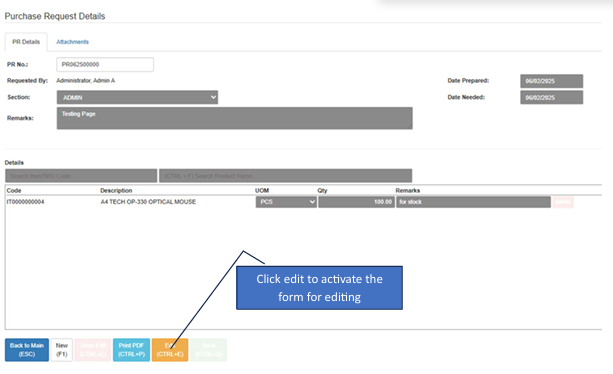
Enter Edit Mode
Click the Edit button to unlock the transaction details.Modify Records
Update quantities or add missing items.Commit or Discard
Save: Becomes active only while in editing mode. Click to save changes.
Undo Edit: Click to cancel changes and exit edit mode without saving.
Navigation Tips
Back to Main: Returns to the list view without saving the current transaction.
Close Button: After inserting items manually, click Close to return to the main transaction form.